> ## Documentation Index
> Fetch the complete documentation index at: https://docs.smartinterview.ai/llms.txt
> Use this file to discover all available pages before exploring further.
# Smartinterview: integraiton with sphinx declic/sphinx iq3
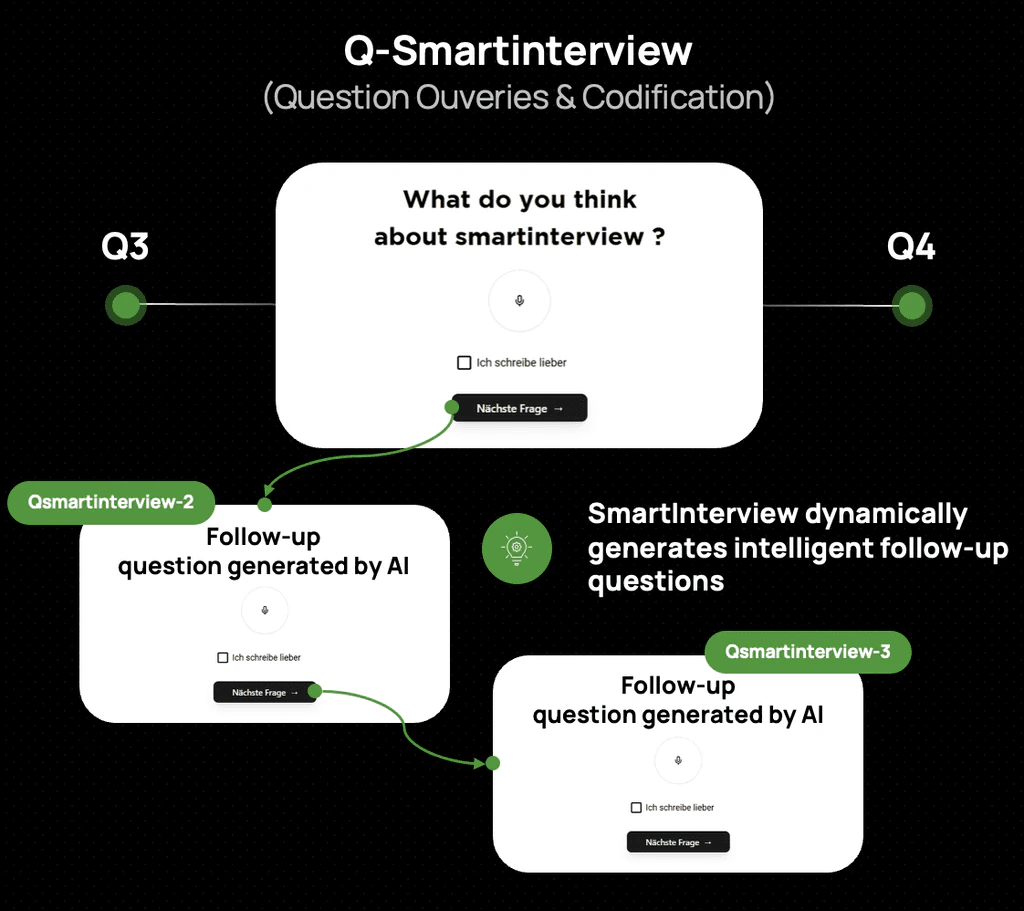 ### **Introduction**
SmartInterview's AI-powered vocal interviews can be combined with **Sphinx Online** surveys to add qualitative depth to your quantitative research. This guide covers integration with both Sphinx products:
* **Sphinx iQ3**: the full-featured desktop + online suite
* **Sphinx Declic**: the lightweight online survey tool
Each has different capabilities, so the recommended integration approach differs.
### **Which Sphinx product are you using?**
| | Sphinx iQ3 | Sphinx Declic |
| :-------------------------- | :----------------------------- | :------------------------------ |
| Custom HTML in questions | Yes (full HTML editor) | Limited (rich text editor only) |
| iframe embedding | Yes | No |
| URL redirects | Yes | Yes |
| JavaScript support | Yes | No |
| **Recommended integration** | **Widget (embed) or Redirect** | **Redirect only** |
### **Integration with Sphinx iQ3**
Sphinx iQ3 offers full HTML control, giving you two options:
### **Option A: Widget (embed SmartInterview inside your Sphinx survey)**
The respondent stays within the Sphinx interface. A SmartInterview question appears inline as an embedded widget.
**Step 1 - Get your embed code**
In SmartInterview, go to **Builder > Widget**:
### **Introduction**
SmartInterview's AI-powered vocal interviews can be combined with **Sphinx Online** surveys to add qualitative depth to your quantitative research. This guide covers integration with both Sphinx products:
* **Sphinx iQ3**: the full-featured desktop + online suite
* **Sphinx Declic**: the lightweight online survey tool
Each has different capabilities, so the recommended integration approach differs.
### **Which Sphinx product are you using?**
| | Sphinx iQ3 | Sphinx Declic |
| :-------------------------- | :----------------------------- | :------------------------------ |
| Custom HTML in questions | Yes (full HTML editor) | Limited (rich text editor only) |
| iframe embedding | Yes | No |
| URL redirects | Yes | Yes |
| JavaScript support | Yes | No |
| **Recommended integration** | **Widget (embed) or Redirect** | **Redirect only** |
### **Integration with Sphinx iQ3**
Sphinx iQ3 offers full HTML control, giving you two options:
### **Option A: Widget (embed SmartInterview inside your Sphinx survey)**
The respondent stays within the Sphinx interface. A SmartInterview question appears inline as an embedded widget.
**Step 1 - Get your embed code**
In SmartInterview, go to **Builder > Widget**:
 1. Select the **"Sphinx"** theme to match the visual style (adapt the color if needed)
2. Copy the embed code:
```text theme={null}
```
/
> `allow="microphone; camera"`\_ is required for vocal questions.\_
**Step 2 - Insert in Sphinx iQ3**
1. Add a **Text / Multimedia** question
2. Open the **HTML source editor** (`<>` button)
3. Paste the iframe code
4. Replace `RESPONDENT_ID` with your Sphinx respondent variable (e.g. `{ID_RESP}`)
**Step 3 - Match the style**
The `?theme=sphinx` parameter automatically applies the Sphinx visual identity:
* Golden buttons (#d4a534)
* Gotham font
* Transparent background
The SmartInterview question blends seamlessly into your Sphinx survey.
**Advantages:**
* Zero navigation away from Sphinx — the respondent stays on the same page
* Fully integrated experience
* All Sphinx routing and quotas continue to work normally
**Limitations:**
* Requires Sphinx iQ3 (HTML editor access)
* Some Sphinx iQ3 hosting configurations may restrict iframes — test before going live
### **Option B: Redirect (link from Sphinx to SmartInterview)**
The respondent is redirected to SmartInterview for the AI interview, then comes back.
```text theme={null}
Sphinx iQ3 survey → SmartInterview (AI vocal interview) → Sphinx iQ3 (next section)
```
See the **Redirect setup** section below — the steps are the same for iQ3 and Declic.
### **Integration with Sphinx Declic**
Sphinx Declic does not support custom HTML or iframes in its question editor. You have two strategies:
### **Strategy 1: Redirect from Declic to SmartInterview (Recommended)**
Design your structured questions (scales, MCQ, matrices) in Sphinx Declic. At the point where you need an AI vocal question, redirect the respondent to SmartInterview, then bring them back.
```text theme={null}
Sphinx Declic survey → SmartInterview (AI vocal interview) → Sphinx Declic (end / next section)
```
This is the simplest and most reliable approach. See the **Redirect setup** section below.
### **Strategy 2: Build in Sphinx Declic, embed as a widget in SmartInterview**
If you prefer to keep your Sphinx Declic survey as the "main" questionnaire, you can embed it inside a SmartInterview question instead of the other way around.
**How it works:**
1. Build your full survey in Sphinx Declic as usual
2. In SmartInterview, create a question with a **Redirection** layout that points to your Sphinx Declic survey URL (specify URL of the survey and "user-\_Id" parameters
1. Select the **"Sphinx"** theme to match the visual style (adapt the color if needed)
2. Copy the embed code:
```text theme={null}
```
/
> `allow="microphone; camera"`\_ is required for vocal questions.\_
**Step 2 - Insert in Sphinx iQ3**
1. Add a **Text / Multimedia** question
2. Open the **HTML source editor** (`<>` button)
3. Paste the iframe code
4. Replace `RESPONDENT_ID` with your Sphinx respondent variable (e.g. `{ID_RESP}`)
**Step 3 - Match the style**
The `?theme=sphinx` parameter automatically applies the Sphinx visual identity:
* Golden buttons (#d4a534)
* Gotham font
* Transparent background
The SmartInterview question blends seamlessly into your Sphinx survey.
**Advantages:**
* Zero navigation away from Sphinx — the respondent stays on the same page
* Fully integrated experience
* All Sphinx routing and quotas continue to work normally
**Limitations:**
* Requires Sphinx iQ3 (HTML editor access)
* Some Sphinx iQ3 hosting configurations may restrict iframes — test before going live
### **Option B: Redirect (link from Sphinx to SmartInterview)**
The respondent is redirected to SmartInterview for the AI interview, then comes back.
```text theme={null}
Sphinx iQ3 survey → SmartInterview (AI vocal interview) → Sphinx iQ3 (next section)
```
See the **Redirect setup** section below — the steps are the same for iQ3 and Declic.
### **Integration with Sphinx Declic**
Sphinx Declic does not support custom HTML or iframes in its question editor. You have two strategies:
### **Strategy 1: Redirect from Declic to SmartInterview (Recommended)**
Design your structured questions (scales, MCQ, matrices) in Sphinx Declic. At the point where you need an AI vocal question, redirect the respondent to SmartInterview, then bring them back.
```text theme={null}
Sphinx Declic survey → SmartInterview (AI vocal interview) → Sphinx Declic (end / next section)
```
This is the simplest and most reliable approach. See the **Redirect setup** section below.
### **Strategy 2: Build in Sphinx Declic, embed as a widget in SmartInterview**
If you prefer to keep your Sphinx Declic survey as the "main" questionnaire, you can embed it inside a SmartInterview question instead of the other way around.
**How it works:**
1. Build your full survey in Sphinx Declic as usual
2. In SmartInterview, create a question with a **Redirection** layout that points to your Sphinx Declic survey URL (specify URL of the survey and "user-\_Id" parameters
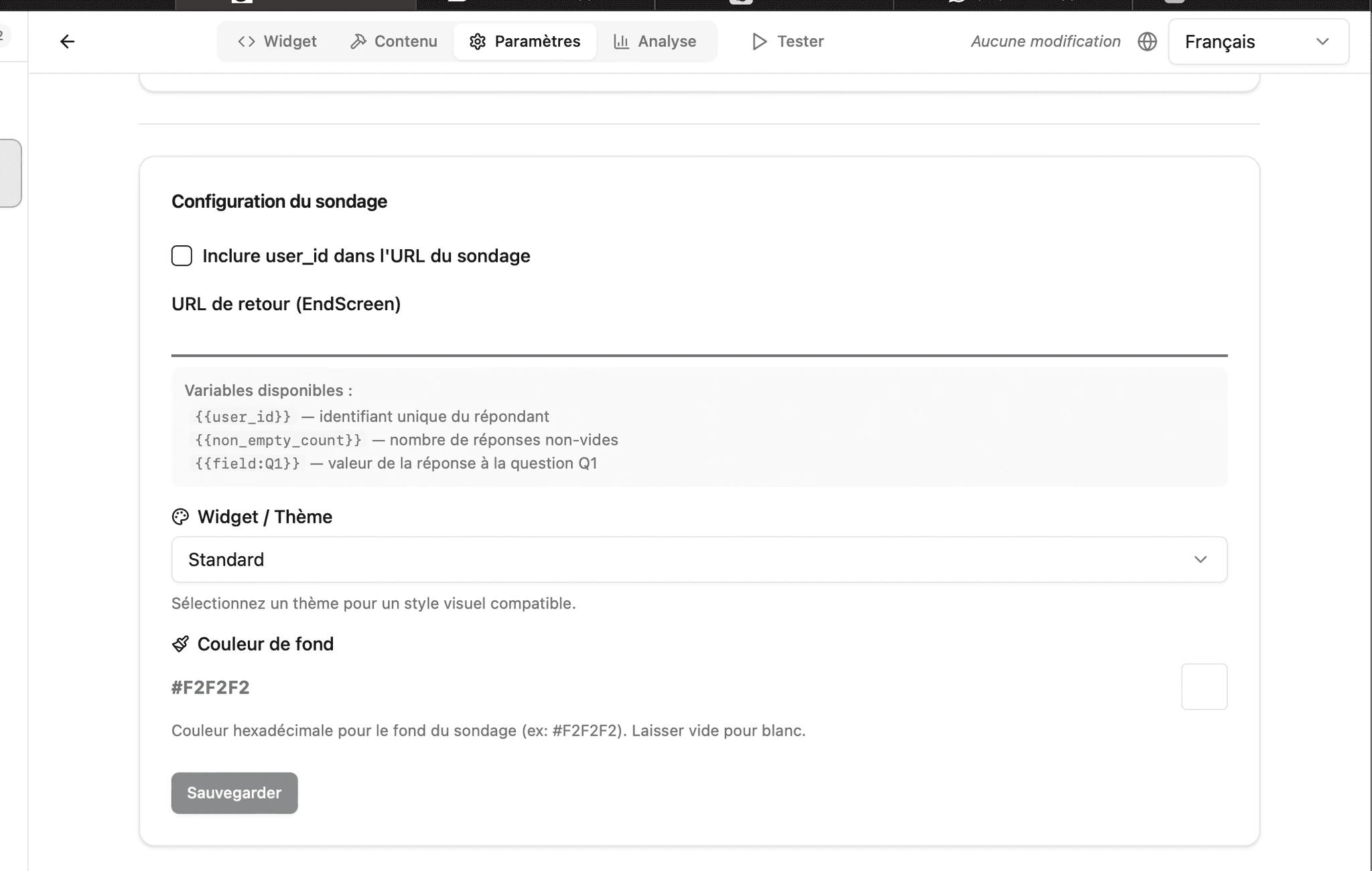 1. Or use the SmartInterview **rich text editor** to insert a link to your Sphinx Declic survey within the question text
**When to use this:**
* You want SmartInterview to be the entry point (e.g., for vocal questions first, then structured Declic questions)
* You want to use SmartInterview's respondent tracking and AI classification on top of Declic data
## **Redirect setup (both iQ3 and Declic)**
### **Step 1: Prepare your SmartInterview survey**
1. Create your survey in SmartInterview with the vocal/AI questions
1. Or use the SmartInterview **rich text editor** to insert a link to your Sphinx Declic survey within the question text
**When to use this:**
* You want SmartInterview to be the entry point (e.g., for vocal questions first, then structured Declic questions)
* You want to use SmartInterview's respondent tracking and AI classification on top of Declic data
## **Redirect setup (both iQ3 and Declic)**
### **Step 1: Prepare your SmartInterview survey**
1. Create your survey in SmartInterview with the vocal/AI questions
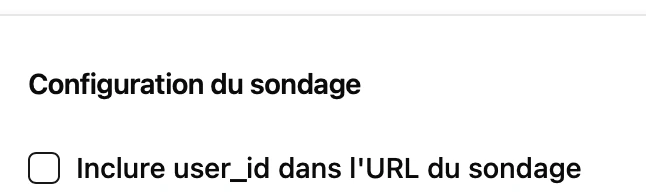 1. In **Builder > Settings**, let "user\_id" use *null.*
2. Configure the **Return URL** to point back to your Sphinx survey:
```text theme={null}
Link example: https://sphinxdeclic.com/surveyserver/p/5EEvzKnPoI#3
(no parameters to specify, only the "page" to redirect to. (here #3)
```
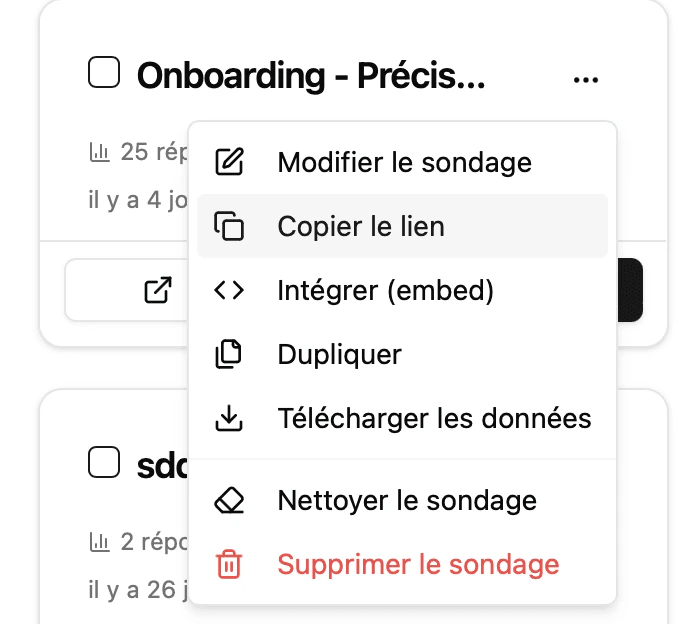
3. Copy the **Direct link** from **the "survey home" > 3-dots > Copy link**
1. In **Builder > Settings**, let "user\_id" use *null.*
2. Configure the **Return URL** to point back to your Sphinx survey:
```text theme={null}
Link example: https://sphinxdeclic.com/surveyserver/p/5EEvzKnPoI#3
(no parameters to specify, only the "page" to redirect to. (here #3)
```
3. Copy the **Direct link** from **the "survey home" > 3-dots > Copy link**
 ### **Step 2: Configure the redirect in Sphinx-declic**
In your Sphinx questionnaire:
1. Add a **Link** element (Layout Type > Redirection)
### **Step 2: Configure the redirect in Sphinx-declic**
In your Sphinx questionnaire:
1. Add a **Link** element (Layout Type > Redirection)
 2. Set the URL to your SmartInterview survey from the copy link
```text theme={null}
https://www.smartinterview.ch/fr/eb101e6d-6457-4ac2-8541-3274755e2c1b
```
3. All URL parameters are automatically captured by SmartInterview and stored with the response
2. Set the URL to your SmartInterview survey from the copy link
```text theme={null}
https://www.smartinterview.ch/fr/eb101e6d-6457-4ac2-8541-3274755e2c1b
```
3. All URL parameters are automatically captured by SmartInterview and stored with the response
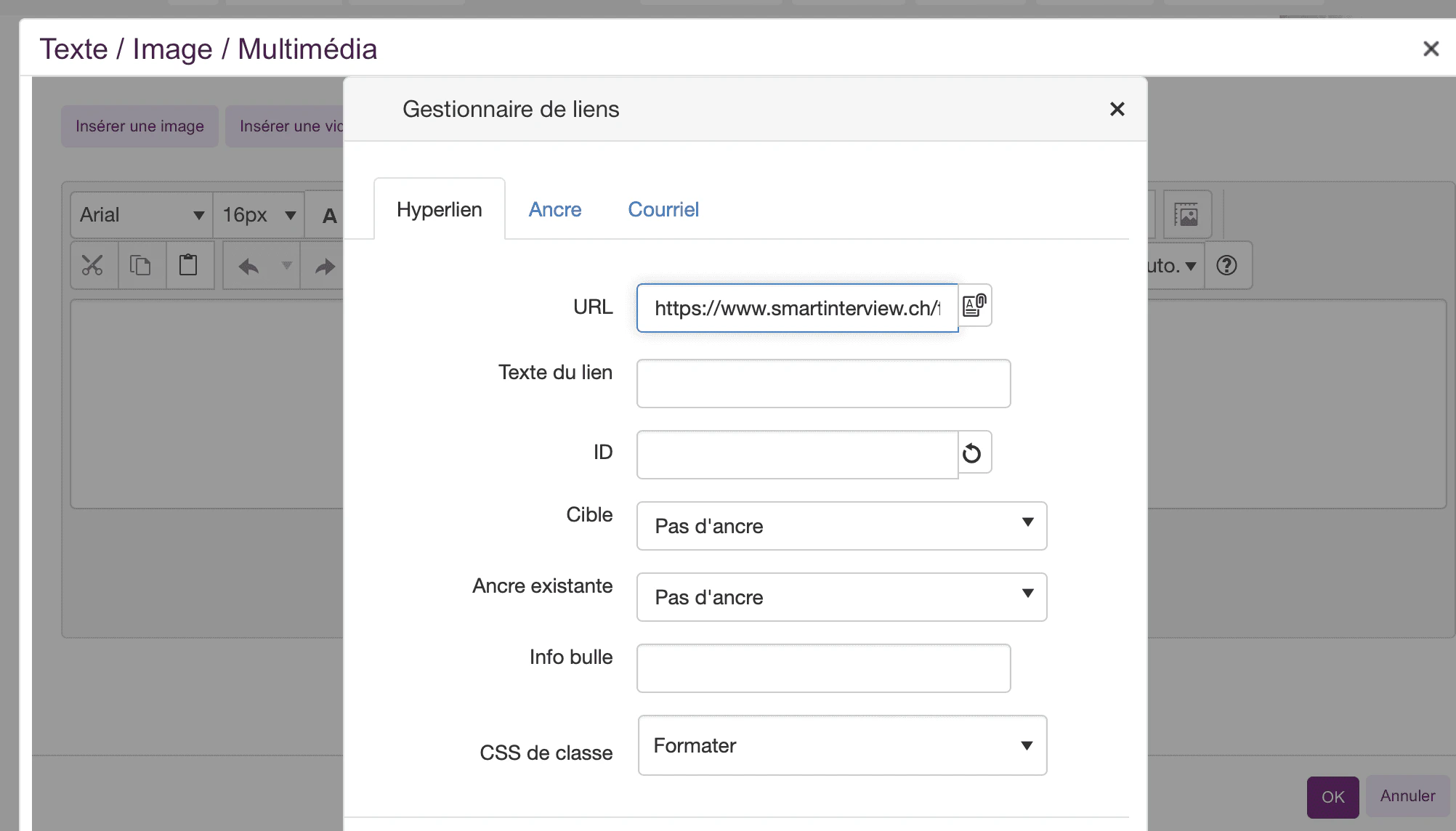 4. We recommend adding a short explanation, such as "For this part of the interview, you should click on the following link and reply with/without your voice to the survey".
### **Step 3: Configure the return to Sphinx**
In SmartInterview **Builder > Settings > Redirect URL**:
4. We recommend adding a short explanation, such as "For this part of the interview, you should click on the following link and reply with/without your voice to the survey".
### **Step 3: Configure the return to Sphinx**
In SmartInterview **Builder > Settings > Redirect URL**:
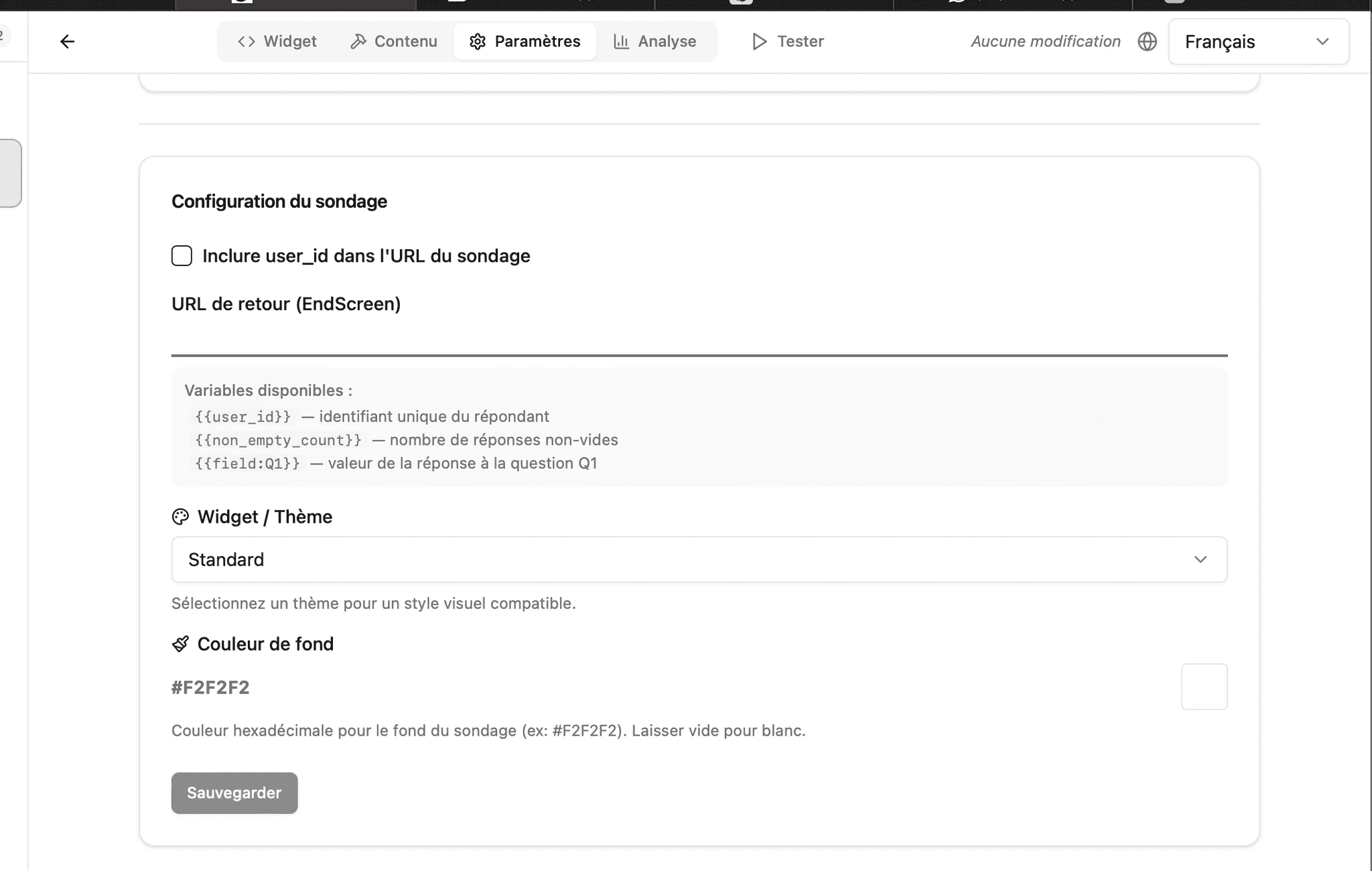 ```text theme={null}
https://sphinxdeclic.com/surveyserver/p/5EEvzKnPoI#3
```
SmartInterview replaces `{{param_name}}` placeholders with the actual values received in Step 2.
### **What gets captured**
All URL parameters passed from Sphinx are:
* Stored in the respondent transcript
* Available as response-level metadata
* Usable in **display conditions** (show/hide questions based on parameter values)
* Passed back to Sphinx via the return URL
## **Matching the visual style**
SmartInterview includes a built-in **Sphinx theme** that matches the Sphinx Online visual identity:
| Element | Style |
| :--------- | :------------------------------- |
| Font | Gotham, sans-serif |
| Background | Transparent (inherits from host) |
| Inputs | Underline style, golden accent |
To activate: **Builder > Settings > Theme > Sphinx**
For widget embeds, add `?theme=sphinx` to the embed URL.
## **Using display conditions with Sphinx parameters**
Once URL parameters are captured, you can create conditional logic in SmartInterview:
**Example:** Show a specific follow-up question only for respondents in group A.
1. Pass the group from Sphinx: `?group=A`
2. In SmartInterview Builder, add a **Display condition** on the question:
* Field: `group`
* Operator: `equals`
* Value: `A`
This allows you to personalize the AI interview based on Sphinx survey responses.
## **Summary: Which approach to choose?**
### **You have Sphinx iQ3**
> *iQ3 supports custom HTML, so you have two options.*
* **Option 1 - Widget embed** *(best experience):* Embed a SmartInterview question directly inside your Sphinx iQ3 survey using an iframe. The respondent never leaves Sphinx.
```text theme={null}
Respondent opens Sphinx iQ3 → answers Sphinx questions → reaches the SmartInterview iframe → records vocal answer inline → continues in Sphinx
```
* **Option 2 - Redirect** *(simpler setup):* Add a link in Sphinx iQ3 that sends the respondent to SmartInterview, then brings them back.
```text theme={null}
Sphinx iQ3 → click link → SmartInterview (vocal interview) → redirect back → Sphinx iQ3
```
### **You have Sphinx Declic**
> *Declic does NOT support iframes or custom HTML. You have two strategies.*
**Strategy 1 - Redirect from Declic to SmartInterview** *(recommended).* Build your structured questions in Declic. When you need an AI vocal question, redirect the respondent to SmartInterview, then bring them back to Declic.
```text theme={null}
Sphinx Declic → redirect → SmartInterview (vocal interview) → redirect back → Sphinx Declic
```
**Strategy 2 - Start in SmartInterview, link to Declic**. Use SmartInterview as the entry point. The respondent starts with the AI vocal interview, then is redirected to your Declic survey for structured questions.
```text theme={null}
SmartInterview (vocal interview) → redirect → Sphinx Declic (structured questions) → end
```
### **Not sure? Start here**
If you're unsure which approach fits your study, ask yourself:
1. **Do I need the AI follow-up + vocal/text question in the middle of my Sphinx survey?** → Use **Redirect** (or Widget if iQ3)
2. **Do I want vocal questions first, then structured questions?** → Use **SmartInterview as** an **entry point** with a redirect to Sphinx
3. **Do I want the simplest possible setup with the fastest setup?** → Consider using [**SmartInterview alone**](https://www.smartinterview.ch/fr/auth/login): it handles both structured and vocal questions in one place
# **Recommendation**
## **Why SmartInterview alone is the smarter choice**
### **The challenge with Sphinx Declic + SmartInterview**
Combining two survey platforms means:
* **Respondent fatigue**: switching between two interfaces breaks the flow, increases drop-off rates, and confuses participants
* **Fragmented data**: responses split across two systems, requiring manual merging for analysis
* **Maintenance overhead**: two platforms to manage, two subscriptions, two sets of credentials
## **SmartInterview does everything Declic does — and more**
| Feature | Sphinx Declic | SmartInterview |
| :--------------------------------- | :------------ | :----------------------------------------------- |
| Multiple choice questions | Yes | Yes |
| Scales & matrices | Yes | Yes |
| Open-ended text questions | Yes | Yes |
| Skip logic & conditions | Yes | Yes |
| URL parameters & redirects | Yes | Yes |
| Multi-language support | Limited | Built-in (FR, EN, DE) |
| **AI vocal interviews** | No | Yes |
| **Real-time transcription** | No | Yes |
| **AI-powered follow-up questions** | No | Yes — context-aware, automatic |
| **Automated open-ended coding** | No | Yes (Pulse Classifier) |
| **Sentiment analysis** | No | Yes |
| **Co-occurrence matrix** | No | Yes |
| **Customizable themes** | Limited | Sphinx, LimeSurvey.. and soon more customization |
| **Video responses** | No | Yes |
## **The benefits of going all-in on SmartInterview**
### **1. Faster programming**
One platform, one interface. Design your entire questionnaire, structured and qualitative, in a single builder. No redirect configuration, no parameter passing, no cross-platform testing.
**Time saved: 50–70% on survey setup compared to Sphinx.**
### **2. Zero respondent fatigue**
Respondents stay in one seamless experience from start to finish. No page redirects, no visual style changes, no loading screens between platforms. This directly translates to:
* **Higher completion rates** (typically +15–25%)
* **Better data quality**: engaged respondents give richer answers
* 2-3 more codes
* Codification quality: Innosuisse patent on the algorithm.
* **Lower cost per complete**
### **3. Deeper insights**
SmartInterview's AI doesn't just collect answers — it **understands** them:
* **AI follow-up questions** probe deeper based on what the respondent actually said
* **Real-time transcription** converts vocal responses to text instantly
* **Pulse Classifier** automatically codes thousands of open-ended responses into topics
* **Sentiment analysis** reveals the emotional tone behind every response
* **Co-occurrence analysis** shows which themes appear together
With Sphinx Declic, open-ended responses sit in a spreadsheet waiting to be manually coded. With SmartInterview, they're analyzed in minutes.
### **4. Richer conclusions**
Your final deliverable is stronger because:
* Quantitative and qualitative data live in one place
* AI-generated topics and sentiment are immediately available for cross-tabulation
* Export includes classified responses, topic distributions, and analytics dashboards
* No manual data merging, no copy-paste between systems
### **5. One subscription, one invoice**
Simplify your procurement. One platform, one contract, one support contact.
## **What about my existing Sphinx Declic surveys?**
**Coming soon**: SmartInterview will support automatic project migration from Sphinx Declic and other platforms. Import your existing questionnaires and respondent data directly: no need to reprogram from scratch.
In the meantime, our team can help you recreate your Declic surveys in SmartInterview in a fraction of the time it took to build them originally.
## **Ready to try it?**
Start building your first SmartInterview survey now:
[**Log in to SmartInterview**](https://www.smartinterview.ch/fr/auth/login)
No Sphinx. No redirects. No compromise.
*Questions? Contact us at [**info@smartinterview.ai**](mailto:info@smartinterview.ai): we'll help you to migrate all your projects.*
## **Quick start checklist**
* Identify which Sphinx product you are using (iQ3 or Declic)
* Create your SmartInterview survey with vocal questions
* Set the **Sphinx theme** in Builder > Settings
* Configure the **Return URL** with `{{user_id}}` placeholder
* Add the redirect or iframe in your Sphinx survey with the respondent ID
* Test the full round-trip with a test respondent
* Verify URL parameters appear in SmartInterview response data
## **Need help?**
Contact us at [**info@smartinterview.ai**](mailto:info@smartinterview.ai) for integration support.
```text theme={null}
https://sphinxdeclic.com/surveyserver/p/5EEvzKnPoI#3
```
SmartInterview replaces `{{param_name}}` placeholders with the actual values received in Step 2.
### **What gets captured**
All URL parameters passed from Sphinx are:
* Stored in the respondent transcript
* Available as response-level metadata
* Usable in **display conditions** (show/hide questions based on parameter values)
* Passed back to Sphinx via the return URL
## **Matching the visual style**
SmartInterview includes a built-in **Sphinx theme** that matches the Sphinx Online visual identity:
| Element | Style |
| :--------- | :------------------------------- |
| Font | Gotham, sans-serif |
| Background | Transparent (inherits from host) |
| Inputs | Underline style, golden accent |
To activate: **Builder > Settings > Theme > Sphinx**
For widget embeds, add `?theme=sphinx` to the embed URL.
## **Using display conditions with Sphinx parameters**
Once URL parameters are captured, you can create conditional logic in SmartInterview:
**Example:** Show a specific follow-up question only for respondents in group A.
1. Pass the group from Sphinx: `?group=A`
2. In SmartInterview Builder, add a **Display condition** on the question:
* Field: `group`
* Operator: `equals`
* Value: `A`
This allows you to personalize the AI interview based on Sphinx survey responses.
## **Summary: Which approach to choose?**
### **You have Sphinx iQ3**
> *iQ3 supports custom HTML, so you have two options.*
* **Option 1 - Widget embed** *(best experience):* Embed a SmartInterview question directly inside your Sphinx iQ3 survey using an iframe. The respondent never leaves Sphinx.
```text theme={null}
Respondent opens Sphinx iQ3 → answers Sphinx questions → reaches the SmartInterview iframe → records vocal answer inline → continues in Sphinx
```
* **Option 2 - Redirect** *(simpler setup):* Add a link in Sphinx iQ3 that sends the respondent to SmartInterview, then brings them back.
```text theme={null}
Sphinx iQ3 → click link → SmartInterview (vocal interview) → redirect back → Sphinx iQ3
```
### **You have Sphinx Declic**
> *Declic does NOT support iframes or custom HTML. You have two strategies.*
**Strategy 1 - Redirect from Declic to SmartInterview** *(recommended).* Build your structured questions in Declic. When you need an AI vocal question, redirect the respondent to SmartInterview, then bring them back to Declic.
```text theme={null}
Sphinx Declic → redirect → SmartInterview (vocal interview) → redirect back → Sphinx Declic
```
**Strategy 2 - Start in SmartInterview, link to Declic**. Use SmartInterview as the entry point. The respondent starts with the AI vocal interview, then is redirected to your Declic survey for structured questions.
```text theme={null}
SmartInterview (vocal interview) → redirect → Sphinx Declic (structured questions) → end
```
### **Not sure? Start here**
If you're unsure which approach fits your study, ask yourself:
1. **Do I need the AI follow-up + vocal/text question in the middle of my Sphinx survey?** → Use **Redirect** (or Widget if iQ3)
2. **Do I want vocal questions first, then structured questions?** → Use **SmartInterview as** an **entry point** with a redirect to Sphinx
3. **Do I want the simplest possible setup with the fastest setup?** → Consider using [**SmartInterview alone**](https://www.smartinterview.ch/fr/auth/login): it handles both structured and vocal questions in one place
# **Recommendation**
## **Why SmartInterview alone is the smarter choice**
### **The challenge with Sphinx Declic + SmartInterview**
Combining two survey platforms means:
* **Respondent fatigue**: switching between two interfaces breaks the flow, increases drop-off rates, and confuses participants
* **Fragmented data**: responses split across two systems, requiring manual merging for analysis
* **Maintenance overhead**: two platforms to manage, two subscriptions, two sets of credentials
## **SmartInterview does everything Declic does — and more**
| Feature | Sphinx Declic | SmartInterview |
| :--------------------------------- | :------------ | :----------------------------------------------- |
| Multiple choice questions | Yes | Yes |
| Scales & matrices | Yes | Yes |
| Open-ended text questions | Yes | Yes |
| Skip logic & conditions | Yes | Yes |
| URL parameters & redirects | Yes | Yes |
| Multi-language support | Limited | Built-in (FR, EN, DE) |
| **AI vocal interviews** | No | Yes |
| **Real-time transcription** | No | Yes |
| **AI-powered follow-up questions** | No | Yes — context-aware, automatic |
| **Automated open-ended coding** | No | Yes (Pulse Classifier) |
| **Sentiment analysis** | No | Yes |
| **Co-occurrence matrix** | No | Yes |
| **Customizable themes** | Limited | Sphinx, LimeSurvey.. and soon more customization |
| **Video responses** | No | Yes |
## **The benefits of going all-in on SmartInterview**
### **1. Faster programming**
One platform, one interface. Design your entire questionnaire, structured and qualitative, in a single builder. No redirect configuration, no parameter passing, no cross-platform testing.
**Time saved: 50–70% on survey setup compared to Sphinx.**
### **2. Zero respondent fatigue**
Respondents stay in one seamless experience from start to finish. No page redirects, no visual style changes, no loading screens between platforms. This directly translates to:
* **Higher completion rates** (typically +15–25%)
* **Better data quality**: engaged respondents give richer answers
* 2-3 more codes
* Codification quality: Innosuisse patent on the algorithm.
* **Lower cost per complete**
### **3. Deeper insights**
SmartInterview's AI doesn't just collect answers — it **understands** them:
* **AI follow-up questions** probe deeper based on what the respondent actually said
* **Real-time transcription** converts vocal responses to text instantly
* **Pulse Classifier** automatically codes thousands of open-ended responses into topics
* **Sentiment analysis** reveals the emotional tone behind every response
* **Co-occurrence analysis** shows which themes appear together
With Sphinx Declic, open-ended responses sit in a spreadsheet waiting to be manually coded. With SmartInterview, they're analyzed in minutes.
### **4. Richer conclusions**
Your final deliverable is stronger because:
* Quantitative and qualitative data live in one place
* AI-generated topics and sentiment are immediately available for cross-tabulation
* Export includes classified responses, topic distributions, and analytics dashboards
* No manual data merging, no copy-paste between systems
### **5. One subscription, one invoice**
Simplify your procurement. One platform, one contract, one support contact.
## **What about my existing Sphinx Declic surveys?**
**Coming soon**: SmartInterview will support automatic project migration from Sphinx Declic and other platforms. Import your existing questionnaires and respondent data directly: no need to reprogram from scratch.
In the meantime, our team can help you recreate your Declic surveys in SmartInterview in a fraction of the time it took to build them originally.
## **Ready to try it?**
Start building your first SmartInterview survey now:
[**Log in to SmartInterview**](https://www.smartinterview.ch/fr/auth/login)
No Sphinx. No redirects. No compromise.
*Questions? Contact us at [**info@smartinterview.ai**](mailto:info@smartinterview.ai): we'll help you to migrate all your projects.*
## **Quick start checklist**
* Identify which Sphinx product you are using (iQ3 or Declic)
* Create your SmartInterview survey with vocal questions
* Set the **Sphinx theme** in Builder > Settings
* Configure the **Return URL** with `{{user_id}}` placeholder
* Add the redirect or iframe in your Sphinx survey with the respondent ID
* Test the full round-trip with a test respondent
* Verify URL parameters appear in SmartInterview response data
## **Need help?**
Contact us at [**info@smartinterview.ai**](mailto:info@smartinterview.ai) for integration support.